
Hands-On Guide to Building Knowledge Graph for Named Entity Recognition
As we have been using graphs to represent semantic relationships between different entities through nodes and arcs, similarly, the knowledge graph is used to model the relationships between entities as given in a knowledge base. It has gained attention in recent times due to its increasing application in many natural language processing tasks where modelling complex relations is difficult using traditional methods. In this article, we will be discussing how to build the knowledge graph for named entity recognition tasks in NLP. Through the hands-on implementation, we will see how the relationships between different entities that exist in the given texts can be represented via a knowledge graph. The major points to be covered in this article are listed below.
Table of Contents
- What is a Knowledge Graph?
- Representation of the Knowledge Graph
- Named Entity Recognition(NER)
- What is a Named Entity?
- What is Named Entity Recognition?
- Building a Knowledge Graph for NER
- Importing Data
- Entity Extraction Function
- Relationship Extraction Function
- Preprocessing Data
- Building Knowledge Graph
What is a Knowledge Graph?
A knowledge graph is a data type or data structure in which the information is modelled in a graphical structure. We can say it is a topology to integrate data. Mainly the knowledge graph is used for storing the information which is interlinked. Because of this inter-linked connection of information, we can say the graph is a set of some nodes and some edges.
In the knowledge graph, the nodes are the holder of the entity information where the edges are the links between the nodes which are holding the information about the relationship between the nodes. The image given below represents the smallest knowledge graph which can also be considered as a tiple.

Representation of Knowledge in a Graph
Before going on deep in making a knowledge graph it is important to understand how a graph consists of knowledge or how to embed knowledge in these graphs. To understand its properties let’s take the example of a cricketer Virat Kohli.
Let us have a look at the below image where node A is having the entity Virat Kohli and node B is having the entity Indian cricket team. And the edge consists of the knowledge “captain of”.
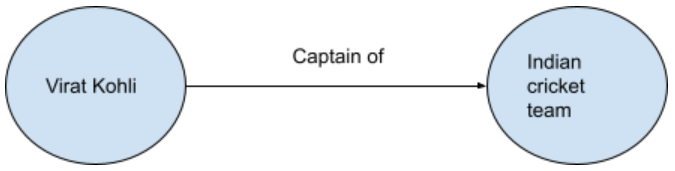
By the above representation, we can say that Virat Kohli is captain of the Indian cricket team and he is also a right-hand batsman. By this we can say that an entity can have multiple relationships with the other entities. The below image is the representation of a node having relation with more than one node.

Also, the Indian cricket team is controlled by the BCCI (Board of Control of Cricket in India) which is a part of ICC (International Cricket Council).

Based on the above representation, we can easily understand how an entity is related to the other entities and also it is difficult to build a knowledge graph manually. The example we are using above is very easy and scalable. We can build a knowledge graph easily using the entities and information but when it comes to making a knowledge graph using thousands of entities presented in the data manually is very difficult so we give this task to make a knowledge graph to machines and algorithms under the machine. For the machine, it is a challenge to understand the natural language which can be done by many natural language processing algorithms like POS tagging, NER, sentence segmentation etc
You can get more information about the implementation of the knowledge graph using python at this link. Next is the article we are going to build a knowledge graph using the named entity recognition. So let’s start by understanding “what is named entity recognition?”.
Named Entity Recognition(NER)
Named Entity recognition can be understood clearly by knowing exactly what a named entity is.
What is the Named Entity?
In any kind of text data, there can be various names of the real-world objects and their names in the data can be considered as the named entities. The name of any person, place of things in the data is a representation of the named entity. Examples of named entities are Virat Kohli, India, MacBook pro etc. or anything that can have a name.
More formally we can say a named entity is a representation of the proper name of any object. As mentioned in the above example, Virat Kohli is the name of a Cricketer, India is the name of a country and MacBook pro is the name of a device(Thing).
What is Named Entity Recognition?
In any text data, the procedure of finding or recognizing the named entity can be called the named entity recognition and after recognizing the named entity we can classify them into different classes. In any text data there can be various words which and segregating named entities and classifying them into their classes is named entity recognition and one point is to notice here these entities in the text data does not consist of any feeling but they consist of relationships between different entities.
So sometimes it becomes very important to identify and classify them so that the model which is going to work on the data can easily understand text data and make results out of them accurately. Such as from a sentence:
“Virat make 160 runs and win a trophy od man of the match at Lords in 2018”
And the named entity recognition system will give results as:
“Virat (person) make a 160 (quantity) runs and win a trophy (thing) of the man of the match (name of object) at lords (place) in 2018 (time)”
Here in the sentence, we can see the recognition process of a NER model by classifying the words into the name of the person, thing, quantity and time. You can get more information about the implementation of Named Entity Recognition in python in this article.
Building a Knowledge Graph for NER
Our major task here is to make knowledge graphs using the NER. Before going in-depth, some of the basic tasks are important.
Importing data
As usual, our first task is to import a data set in which we have text data and information. For this purpose, I am using the data set called wiki_sentences_v2.
import pandas as pd
data = pd.read_csv(dir)
data.head(10)Output

As we can see above, we have a dataset in which we have the sentence variable where the words like Bollywood and contemporary words are in the data. Let’s filter them out.
data[data['sentence'].str.contains('bollywood' and 'contemporary')].head(10)Output:

Entity Extraction Function
Let’s make a function that can help in the extraction of the entity pairs from the data which we have imported.
import spacy
nlp = spacy.load("en_core_web_sm")
def extract_entity(sent):
entity1 = ""
entity2 = ""
prev_token_t = ""
prev_token_d = ""
prefix = ""
modifier = ""
nlp = spacy.load("en_core_web_sm")
for tokens in nlp(sent):
if tokens.dep_ != "punct":
if tokens.dep_ == "compound":
prefix = tokens.text
if prev_token_d == "compound":
modifier = prev_token_t + " " + modifier
if tokens.dep_.find("subj") == True:
entity1 =modifier+ " " + prefix + " " + tokens.text
prefix = ""
modifer = ""
prev_token_t = tokens.text
prev_token_d = tokens.dep_
return [entity1.strip(), entity2.strip()]Here is the function we have used in the spacy library in which the en_core_web_sm model of the library will help in loading English tokenizer, tagger, parser, NER and word vectors. Entity1 and entity2 in function are holding the subject and object entity respectively and if-else functions are designed to go in the sentence if the tokens in the file are not punctuation, compound, modifier or prefix. Let’s check how this function is working.
[entity1,entity2] = get_entity("the film had 2 breaks")
[entity1,entity2]Output:

Hopefully, the function is working as we require it to perform. Now the subjects and entities present in the data set can be saved into the lists.
entity_pairs = []
for i in data['sentence']:
entity_pairs.append(get_entity(i))
subjects = [x[0] for x in entity_pairs]
objects = [x[1] for x in entity_pairs]Relationship Extraction Function
As now we have a list of entities, the next step for making the knowledge graph, we need to define the relationship between them. For this purpose, we are defining a relationship extraction function.
def extract_relation(sent):
nlp = spacy.load("en_core_web_sm")
rel = nlp(sent)
from spacy.matcher import Matcher
match = Matcher(nlp.vocab)
pattern = [{'DEP':'ROOT'},{'DEP':'prep','OP':'?'},{'DEP':'agent','OP':'?'},{'DEP':'ADJ','OP':'?'}]
match.add("matcher_1",None,pattern)
matches = match(rel)
texts = rel[matches[0][1]:matches[0][2]]
return texts.textUnder this function, we are initializing the matcher which will be applied to the relation after defining the pattern and adding the pattern in the matcher. Let’s check our function for the extraction of relationships.
extract_relation(“virat completed the century”)
Output:

As we can see in the sentence we have Virat and century are two entities and the relationship between them is completed so the function is working well. We can put all the relations from the data in a list of relations.
relations = [extract_relation(i) for i in data['sentence']]
relationsNow we know that in text data there are various different data preprocesses required to perform like removing stop words and removing the punctuation. Next, we are going to perform the cleaning of the data so that the relation we are seeking in the data can have a clearer view.
Preprocessing Data
import nltk
from nltk.tokenize import word_tokenize
from nltk.corpus import stopwords
import re
import string
nltk.download('punkt')
nltk.download('stopwords')Defining function for Removing the stopwords.
def NotStopWord(word):
return word not in stopwords.words('english')
Defining a function to remove the punctuations from the data without including the . .? .! punctuations from the data.
def preprocess(sent):
sent = re.sub("[\(\[].*?[\)\]]", "", sent)
tokens = []
temp = ""
words = word_tokenize(sent)
puncts = '"#$%&\'()*+,-/:;<=>@\\^_`{|}~'
words = map(lambda x: x.translate(str.maketrans('','',puncts)), words)Applying the function in the data:
words = map(str.lower,words)
words = filter(lambda x: NotStopWord(x),words)
tokens = tokens + list(words)
temp = ' '.join(word for word in tokens)
return temp
preprocessed_data = [preprocess(i) for i in (data['sentence'])]Building Knowledge Graph
After preprocessing we are required to extract entity and relation again for the clean data set which can be done by using the same function defined before.
entity_pairs = []
for i in preprocessed_data:
entity_pairs.append(extract_entity(i))
relations = [get_relation(i) for i in preprocessed_sentences]Defining relation between only those places where the pair of the entities are available.
entity_pairs_a = entity_pairs
relations_a = relations
entity_pairs_b = []
relations_b = []
for i in range(len(entity_pairs2)):
if entity_pairs2[i][0]!='' and entity_pairs2[i][1]!='':
entity_pairs3.append(entity_pairs2[i])
relations3.append(relations2[i])Let’s check the most accrued entities and relations in the data.
print(" Most occured entite1 \n",pd.Series(source).value_counts()[:10])
print("Most occured entite2 \n",pd.Series(target).value_counts()[:10])
print(" Most popular relation\n",pd.Series(relations).value_counts()[:10])Output:


Now we can make a data frame from these details we have gathered using the NER.
df = pd.DataFrame({'source':source, 'target':target, 'edge':edge})
df.head()
Output:

In the occurrence checking session that entity “khan” has occurred multiple times. Let’s check the visualization of the knowledge graph for the khan entity.
import networkx as nx
import matplotlib.pyplot as plt
Graph = nx.from_pandas_edgelist(df[df['source']=="khan"],source = 'source', target = 'target', edge_attr = True, create_using= nx.MultiDiGraph())
plt.figure(figsize = (10,10))
pox = nx.spring_layout(Graph,k = 1.0)
nx.draw(Graph, with_labels= True, node_size = 2500)
plt.show()Output:

By the output, we can say that the khan entity belongs to Salman khan because we know he is the host of the big boss and also the actor in the movie Veer. Here we can see that we have built a knowledge graph using the named entity recognition. And also we are quite successful in building it.
Final Words
In this article we have seen the basic definitions of the knowledge graph and the Named Entity Recognition and also we have seen how we can use the named entity recognition for building a knowledge graph. Since a knowledge graph requires well-arranged information so that connectivity between the nodes can happen properly. Named entity recognition is a good option for us to define the relationship between the nodes.
References


