

Guide To Video Classification Using PytorchVideo
What do you say if you are being asked what the video is? We may define video as collections of image sets organised in a certain sequence. Frames are a term used to describe a collection of pictures. The video classification problem is not different from image classification, where we do feature extraction using CNN and classify the images based on learned features. Video classification is the task of assigning a label to a video clip. This kind of application is useful if we want to know what activity is happening in the video.
A good video level classifier is one that not only provides accurate frame labels but also describes the entire video given the features and annotation of various frames in the video. For example, a video might contain some animals in a frame, but the label central to the video might be something else. The quality or condition of labels being used to describe the frames and video depends on the task. Typically, tasks include assigning one or more global labels to the videos and assigning one or more labels for each video frame.
Video data is becoming more popular but in addition to its complexity, it often leaves video-related tasks to the backend. PytorchVideo is a new library set out to make video models just as easy to load, build and train as image models. Pytorch video provides access to the video model zoo, video data processing function, and video focus accelerator to deploy models in all backed Pytorch.
In this article, we will learn how to perform video classification using PytorchVideo and visualize the result we are using FiftyOne. With FiftyOne, we can rapidly experiment with our dataset enabling us to search, sort, filter, visualize, analyze the dataset without excess wrangling or writing custom scripts. It also provides powerful functionality analyzing our model, allowing us to understand their strength and weakness, correct their failure mode and more. Furthermore, fiftyOne is designed to be lightweight and easily integrate with our existing computer vision and machine learning models.
Without taking much time, let’s quickly jump to the code implementation. Following code, implementation is in reference to the official implementation.
Code Implementation of PyTorchVideo:
Install all dependencies
!git clone https://github.com/facebookresearch/pytorchvideo.git %cd pytorchvideo !pip install -e . %cd ..
! pip install fiftyone ! pip install fiftyone torch torchvision
Prepare the dataset
We use the subset of kinetics 400 action recognition dataset composed of 400 human activity of 10-sec long video clips.
!pip install youtube-dl !wget https://storage.googleapis.com/deepmind- media/Datasets/kinetics400.tar.gz !tar -xvf ./kinetics400.tar.gz
from datetime import timedelta import json import os import subprocess import youtube_dl from youtube_dl.utils import (DownloadError, ExtractorError)
def download_video(url, start, dur, output):
output_tmp = os.path.join("/tmp",os.path.basename(output))
try:
# From https://stackoverflow.com/questions/57131049/is-it-possible-to-download-a-specific-part-of-a-file
with youtube_dl.YoutubeDL({'format': 'best'}) as ydl:
result = ydl.extract_info(url, download=False)
video = result['entries'][0] if 'entries' in result else result
url = video['url']
if start < 5:
offset = start
else:
offset = 5
start -= offset
offset_dur = dur + offset
start_str = str(timedelta(seconds=start))
dur_str = str(timedelta(seconds=offset_dur))
cmd = ['ffmpeg', '-i', url, '-ss', start_str, '-t', dur_str, '-c:v',
'copy', '-c:a', 'copy', output_tmp]
subprocess.call(cmd)
start_str_2 = str(timedelta(seconds=offset))
dur_str_2 = str(timedelta(seconds=dur))
cmd = ['ffmpeg', '-i', output_tmp, '-ss', start_str_2, '-t', dur_str_2, output]
subprocess.call(cmd)
return True
except (DownloadError, ExtractorError) as e:
print("Failed to download %s" % output)
return False
with open("./kinetics400/test.json", "r") as f:
test_data = json.load(f)
target_classes = [
'springboard diving',
'surfing water',
'swimming backstroke',
'swimming breast stroke',
'swimming butterfly stroke',
]
data_dir = "./videos"
max_samples = 5
classes_count = {c:0 for c in target_classes}
for fn, data in test_data.items():
label = data["annotations"]["label"]
segment = data["annotations"]["segment"]
url = data["url"]
dur = data["duration"]
if label in classes_count and classes_count[label] < max_samples:
c_dir = os.path.join(data_dir, label)
if not os.path.exists(c_dir):
os.makedirs(c_dir)
start = segment[0]
output = os.path.join(c_dir, "%s_%s.mp4" % (label.replace(" ","_"), fn))
results = True
if not os.path.exists(output):
result = download_video(url, start, dur, output)
if result:
classes_count[label] += 1
print("Finished downloading videos!")
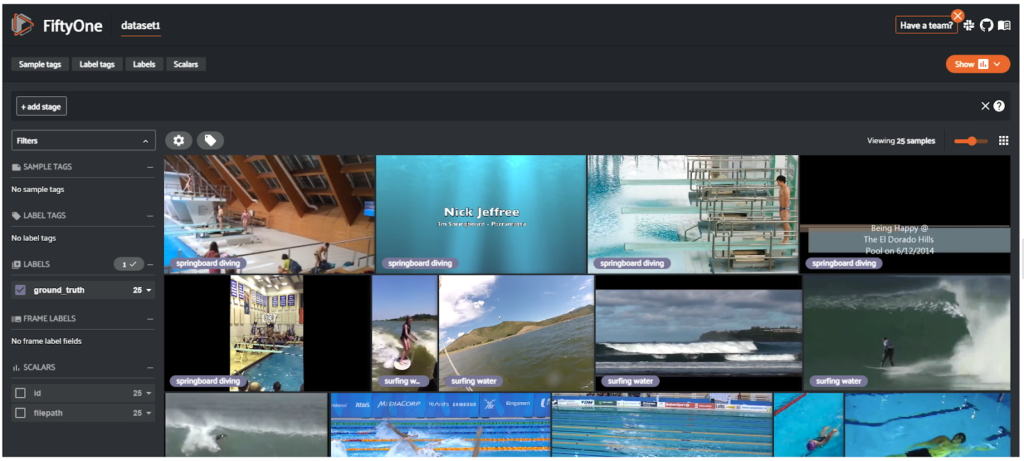
Load the prepared dataset in FiftyOne to visualize
import fiftyone as fo dataset_dir = "./videos" # Create the dataset dataset = fo.Dataset.from_dir( dataset_dir, fo.types.VideoClassificationDirectoryTree, name='dataset' ) # Launch the App and view the dataset session = fo.launch_app(dataset)
Visualise the dataset as below along with labels
Prepare the PytorchVideo model for prediction
We are using pre-trained from torch hub for video classification.
import torch from torchvision.transforms import Compose, Lambda from torchvision.transforms._transforms_video import ( CenterCropVideo, NormalizeVideo, ) from pytorchvideo.transforms import ( ApplyTransformToKey, ShortSideScale, UniformTemporalSubsample )
# Create an id to label name mapping
kinetics_id_to_classname = {v:k for v,k in enumerate(dataset.default_classes)}
All models required a specific type of input so that they can handle Pytorch vision makes this process by providing functions like crop_size, num_frames etc., just like we see in the TensorFlow data augmentation.
side_size = 256 mean = [0.45, 0.45, 0.45] std = [0.225, 0.225, 0.225] crop_size = 256 num_frames = 8 # Note that this transform is specific to the slow_R50 model. # If you want to try another of the torch hub models you will need to modify this transform transform = ApplyTransformToKey( key="video", transform=Compose( [ UniformTemporalSubsample(num_frames), Lambda(lambda x: x/255.0), NormalizeVideo(mean, std), ShortSideScale( size=side_size ), CenterCropVideo(crop_size=(crop_size, crop_size)) ] ), )
Since the dataset is stored in FiftyOne, we can easily iterate through the samples, load and run our model on them with PyTorchVideo.
from pytorchvideo.data.encoded_video import EncodedVideo import fiftyone.core.utils as fouo def parse_predictions(preds, kinetics_id_to_classname, k=5): preds_topk = preds.topk(k=k) pred_classes = preds_topk.indices[0] pred_scores = preds_topk.values[0] preds_top1 = preds.topk(k=1) pred_class = preds_top1.indices[0] pred_score = preds_top1.values[0] # Map the predicted classes to the label names pred_class_names = [kinetics_id_to_classname[int(i)] for i in pred_classes] pred_class_name = kinetics_id_to_classname[int(pred_class)] prediction_top_1 = fo.Classification( label=pred_class_name, confidence=pred_score, ) predictions_top_k = [] for l, c in zip(pred_class_names, pred_scores): cls = fo.Classification(label=l, confidence=c) predictions_top_k.append(cls) predictions_top_k = fo.Classifications(classifications=predictions_top_k) return prediction_top_1, predictions_top_k
Train the model
with torch.no_grad(): with fouo.ProgressBar() as pb: for sample in pb(dataset): video_path = sample.filepath # Initialize an EncodedVideo helper class video = EncodedVideo.from_path(video_path) # Select the duration of the clip to load by specifying the start and end duration # The start_sec should correspond to where the action occurs in the video start_sec = 0 clip_duration = int(video.duration) end_sec = start_sec + clip_duration # Load the desired clip video_data = video.get_clip(start_sec=start_sec, end_sec=end_sec) # Apply a transform to normalize the video input video_data = transform(video_data) # Move the inputs to the desired device inputs = video_data["video"] inputs = inputs.to(device) # Pass the input clip through the model preds_pre_act = model(inputs[None, ...]) # Get the predicted classes post_act = torch.nn.Softmax(dim=1) preds = post_act(preds_pre_act) # Generate FiftyOne labels from predictions prediction_top_1, predictions_top_5 = parse_predictions(preds, kinetics_id_to_classname, k=5) # Add FiftyOne label fields to Sample sample["predictions"] = prediction_top_1 sample["predictions_top_5"] = predictions_top_5 sample.save()
Evaluate the result with FiftyOne tool
session = fo.launch_app(dataset)

session.freeze()
Conclusion:
This article has discussed how to video classification on the custom dataset using a pre-trained model from PytorchVideo. We have also seen the interactive open-source tool i.e. FiftyOne, which gives in-depth information of your dataset and gives proper labeling for the data, and the same have seen for prediction data.
References:
The post Guide To Video Classification Using PytorchVideo appeared first on Analytics India Magazine.


